SamArt

Gallery art for The Frame

For Samsung The Frame

A gallery for the wall you already own

700+ pieces of 4K art and counting, an AI studio that paints whatever you describe, and your own photos, sent to The Frame in one tap over your home Wi-Fi.

Android and Windows now. iPhone, iPad and Mac coming soon.

 
700+artworks
30+collections
4Kat native size
1 tapto your Frame

What SamArt does

01

The gallery

Original paintings in the spirit of the great movements: Bauhaus, Impressionist gardens, Art Deco travel, woodblock waves, color field and more. Every piece is made at 4K or larger and sent at your Frame’s native resolution, so nothing is stretched or soft.

02

Create

Describe a painting and SamArt makes it while you get on with your day. You’re notified when it’s ready, and it hangs in the Community gallery with your name on it. Unlimited creations with fair-use limits, no credits to buy.

03

Every Frame in the house

All your Frames in one place. Open any TV to set Art Mode brightness, color warmth, the light sensor and sleep timer, build playlists that rotate on their own, and manage what’s already stored on it.

04

My Photos Free

Bring your own photos and art. Import whole folders (they become albums), ZIPs from art shops or Google Photos, then send a photo or a whole album to your Frame. It all stays on your device and home network.

Send to your Frame Unlock

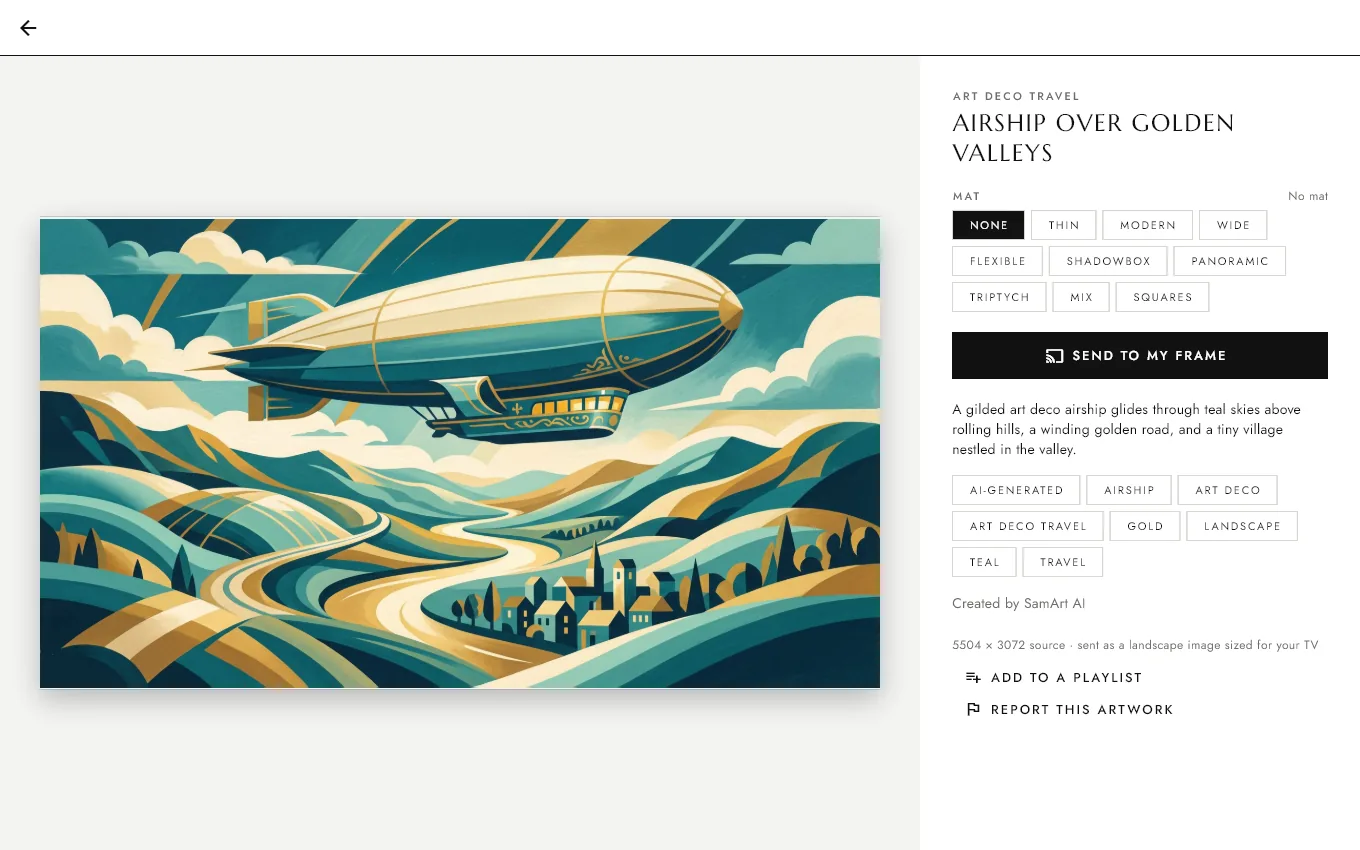
Any piece, with the mat you want

Pick a mat, tap Send to my Frame, and it’s in Art Mode a few seconds later, sized for your TV.

The SamArt app showing an artwork with mat choices and a Send to my Frame button

Create Unlock

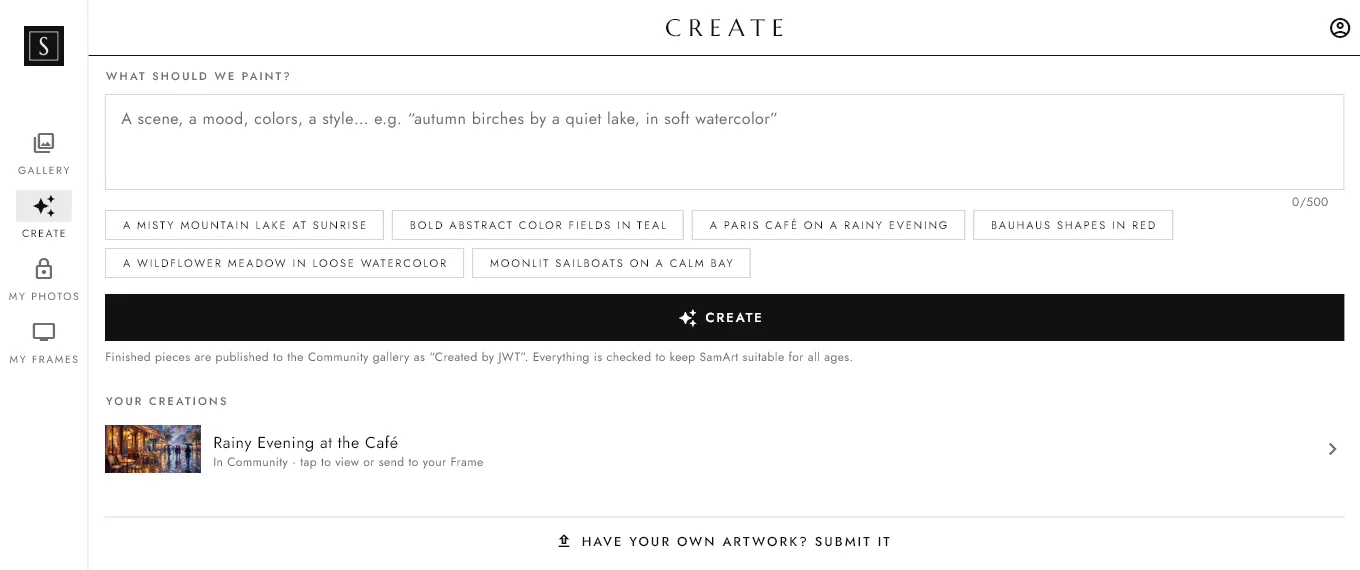
Describe it. SamArt paints it.

Type a scene, a mood or a style, or start from an idea. SamArt paints it in 4K while you get on with your day, tells you when it’s ready, and hangs it in the Community gallery with your name on it.

The Create screen: a prompt box, idea suggestions and a finished creation

My Frames Unlock

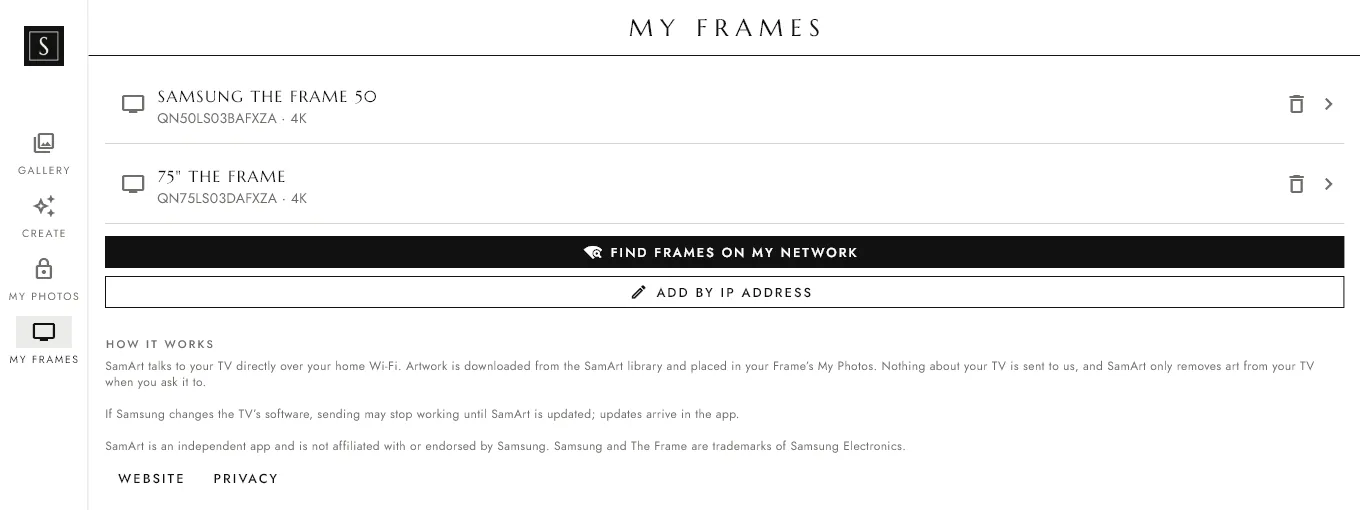
Every Frame in the house

SamArt finds the Frames on your Wi-Fi and keeps them in one list. Tap one to open it.

The My Frames screen listing two Samsung The Frame TVs

TV controls Unlock

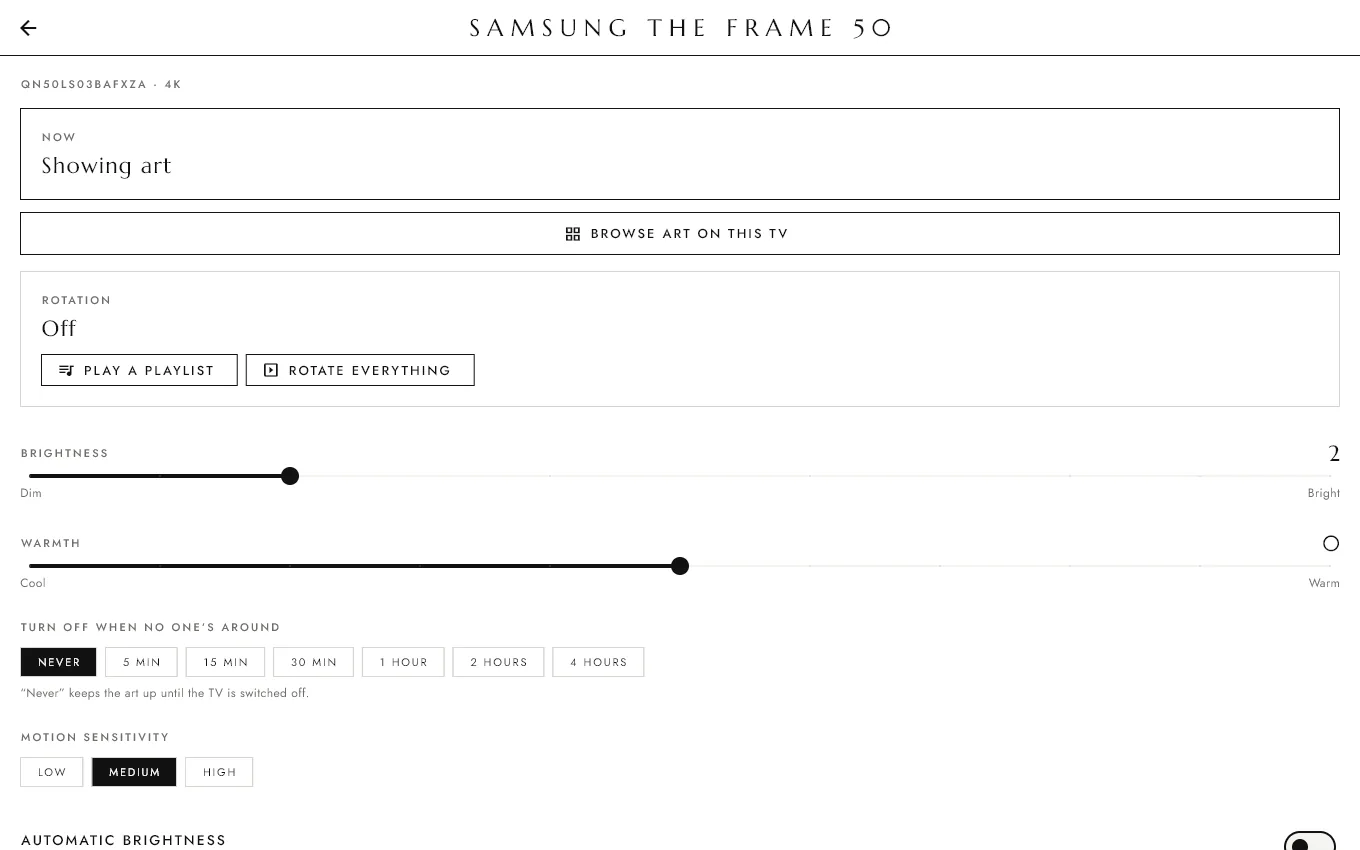
Fine-tune each TV

See what’s showing, browse what’s stored, start a playlist, and set brightness, warmth, the sleep timer, motion sensitivity and automatic brightness, all from your phone or PC.

A Frame's controls: rotation, brightness, warmth, sleep timer and motion sensitivity

Playlists Unlock

Art that changes on its own

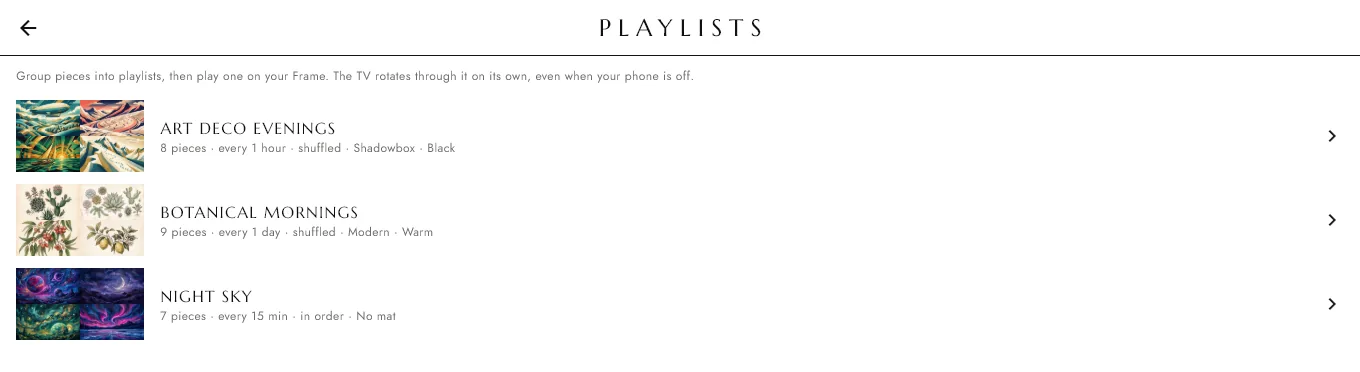
Group pieces into playlists and choose how often they change and which mat they use. The TV rotates through them by itself, even when your phone is off.

The Playlists screen with three playlists and their rotation settings

On this TV Unlock

See what’s on every Frame

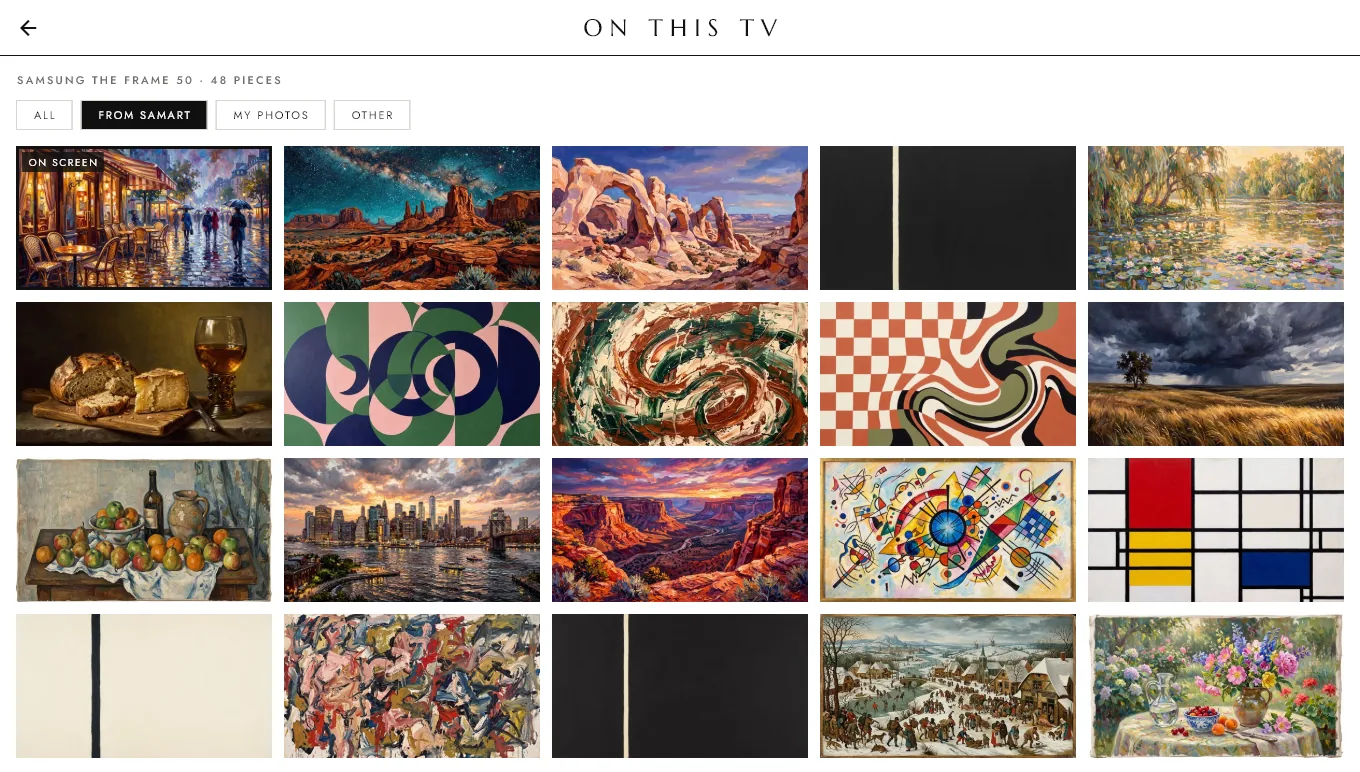
Browse everything stored on a TV, filter by where it came from, change mats, and clear out what you no longer want, without the TV remote.

On this TV: the art stored on a Frame, filtered to pieces from SamArt

Free for everyone

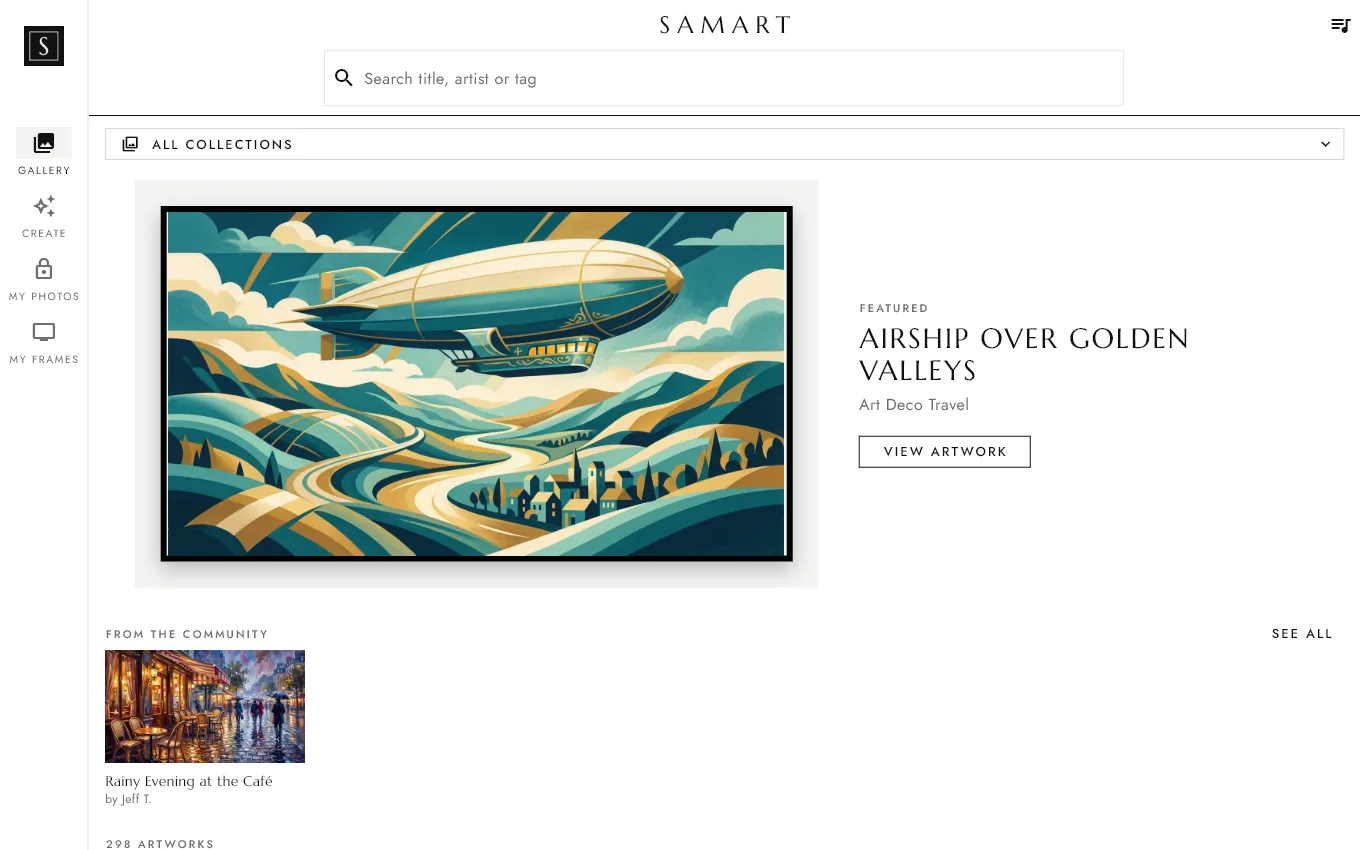
The SamArt gallery with a featured artwork and the Community strip
Browse the whole gallery in preview
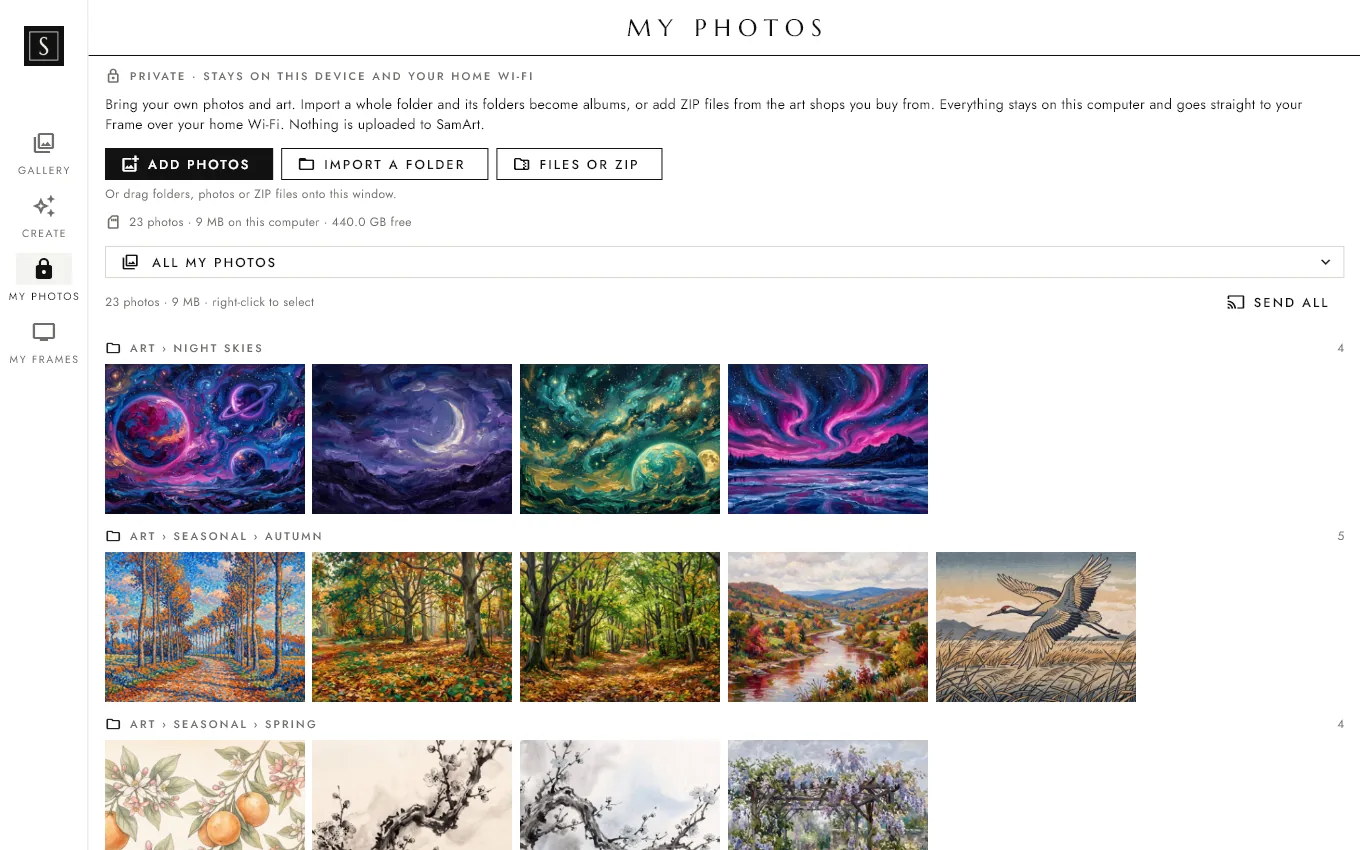
My Photos: imported folders shown as nested albums, with import buttons and the storage line
Your own photos and art, privately

From the collections

See them all in the app

Three steps to the wall

  1. Install SamArt on your phone or PC.
  2. Find your Frame. SamArt looks for it on your Wi-Fi and pairs with one confirmation on the TV.
  3. Pick a piece and send it. It appears in Art Mode a few seconds later.

Free to download

What’s free, and what you get

Free

$0

Look around, and put your own photos on your Frame.

  • Browse the whole gallery in preview
  • Find your Frame on your Wi-Fi
  • Import your own photos and art: whole folders (they become albums), ZIPs and Google Photos
  • Send them to your Frame, one photo or a whole album at a time
  • Private: your photos stay on your device and are never uploaded

SamArt Unlock

$9.99 once

Everything, on up to 5 of your devices.

  • The full gallery, sent in 4K: 700+ pieces of art and counting
  • Create: unlimited AI paintings, shared with the community
  • Every Frame in the house, in one app (the free version sends to one)
  • Per-TV Art Mode controls: brightness, color warmth, light sensor, sleep timer
  • Playlists that rotate art on their own, your own photos included
  • On this TV: see, re-mat, filter and remove what’s stored
  • Your Frames, playlists and mat choice synced across devices
  • Every update included. No subscription, no credits, no ads.
Get the app

US price; other countries vary.

How buying works

  1. Tap Unlock in the app. Your app store’s own checkout opens: Google Play, the Microsoft Store or the App Store. You pay with what’s already on file there; we never see your payment details.
  2. That’s it on this device. No account needed. Everything unlocks straight away.
  3. Sign in to take it with you. Sign in with Google, Apple, Microsoft or an email code, and your unlock, Frames and playlists follow you to your other devices.
  4. Pay once, use it everywhere. On another phone, tablet or PC, even a different platform, install SamArt and sign in. It’s already unlocked, on up to 5 devices.

Questions

How much does it cost?

SamArt is free to download. Browsing the gallery in preview and sending your own photos to your Frame are free. Everything else, from sending gallery art in 4K and Create to playlists and the TV controls, is a one-time purchase of $9.99 in the US (prices vary by country), made in your device’s app store. Sign in and the same purchase works on up to 5 of your devices, even across Android, Windows and Apple.

Do I need an account to buy?

No. You can buy and use SamArt on one device without signing in. Signing in is what lets the same purchase work on your other devices and keeps your Frames, playlists and mat choice in sync.

I bought it on my phone. Do I pay again on my PC?

No. Sign in on the PC with the same account you used on your phone and SamArt is already unlocked. That works across Android, Windows, iPhone, iPad and Mac.

How many devices can I use?

Up to 5 at a time on one account. If you get a new one, remove an old device in the app (it’s signed out straight away) and sign in on the new one.

I got a new phone or reinstalled the app.

Sign in with the same account, or tap Restore Purchases on the unlock screen. Your purchase comes straight back.

Is it a subscription?

No. $9.99 once, with every update included. There are no credits to buy for Create; fair-use limits keep it fast for everyone.

Can I get a refund?

Purchases are made through your app store, so refunds go through the store: Google Play, Apple or Microsoft Store support. A refunded purchase is removed from your account.

Which TVs does it work with?

Samsung The Frame. We test on 2022 and 2024 models, and the art protocol it uses is shared across recent Frames.

Do I need SmartThings or a Samsung account?

No. SamArt talks to The Frame directly over your home network. Your phone or PC and the TV just need to be on the same Wi-Fi.

What size are the images?

Artwork is made at 4K or larger, and the app sends it at your TV’s native resolution: 3840×2160 for 4K Frames and 1920×1080 for Full HD models. The website shows previews; full-resolution art goes to your Frame through the app.

Are my photos uploaded anywhere?

No. Photos you import are kept in SamArt’s private storage on your device and go from there to your TV over your home network. They’re never uploaded to SamArt and never synced to your other devices. See the privacy policy.

What can I create with the AI studio?

Paintings, prints and illustrations in almost any style. Every prompt and every finished image is checked automatically before it’s published, and anything that breaks the rules is removed.

Is SamArt made by Samsung?

No. SamArt is an independent app by Gigadyne, LLC. It isn’t affiliated with or endorsed by Samsung.